3.1 Claude Code 核心概念详解
核心概念详解
•
了解了 Claude Code 的安装配置后,深入了解一下它的一些核心概念。这些概念是充分发挥 Claude Code 能力的基础。
Skills(技能包)
什么是 Skills?
Skills 是预封装的工作流,就像游戏中的"技能包",用完即走,不占用上下文。它是别人已经编写好的、可直接使用的功能模块。
官方 Skills 库: https://github.com/anthropics/skills (32k+ Stars)
Skills 的类型
#KWLErWKZXcDS text { white-space: pre; }#KWLErWKZXcDS .fb0 { stroke: var(--N900-FG, 0.15); }#KWLErWKZXcDS .fb0 {stroke: rgba(31,35,41, 0.15)}#KWLErWKZXcDS .fx0 { stroke-miterlimit: 10; }#KWLErWKZXcDS .fx0 {stroke-miterlimit: 10}#KWLErWKZXcDS .fa1 { fill: rgb(187, 191, 196); }#KWLErWKZXcDS .fa1 {fill: rgb(187, 191, 196)}#KWLErWKZXcDS .fx1 { font: 400 12px MonospacedNumber, LarkHackSafariFont, LarkEmojiFont, LarkChineseQuote, -apple-system, BlinkMacSystemFont, "Helvetica Neue", Tahoma, "PingFang SC", "Microsoft Yahei", Arial, "Hiragino Sans GB", sans-serif, "Apple Color Emoji", "Segoe UI Emoji", "Segoe UI Symbol", "Noto Color Emoji"; }#KWLErWKZXcDS .fx1 {font-style: normal}#KWLErWKZXcDS .fx2 { text-anchor: middle; }#KWLErWKZXcDS .fx2 {text-anchor: middle}#KWLErWKZXcDS .fx3 { dominant-baseline: central; }#KWLErWKZXcDS .fx3 {dominant-baseline: central}#KWLErWKZXcDS .fx4 { stroke: none; }#KWLErWKZXcDS .fx4 {stroke: none}#KWLErWKZXcDS .fc0 { fill: var(--text-caption); }#KWLErWKZXcDS .fc0 {fill: #646a73}#KWLErWKZXcDS .fa2 { fill: var(--text-link-disabled); }#KWLErWKZXcDS .fa2 {fill: rgb(187, 191, 196)}#KWLErWKZXcDS .fa3 { fill: rgb(238, 240, 246); }#KWLErWKZXcDS .fa3 {fill: rgb(238, 240, 246)}#KWLErWKZXcDS .fa4 { fill: rgb(255, 255, 255); }#KWLErWKZXcDS .fa4 {fill: rgb(255, 255, 255)}#KWLErWKZXcDS .fx5 { font: 700 14px MonospacedNumber, LarkHackSafariFont, LarkEmojiFont, LarkChineseQuote, -apple-system, BlinkMacSystemFont, "Helvetica Neue", Tahoma, "PingFang SC", "Microsoft Yahei", Arial, "Hiragino Sans GB", sans-serif, "Apple Color Emoji", "Segoe UI Emoji", "Segoe UI Symbol", "Noto Color Emoji"; }#KWLErWKZXcDS .fx5 {font-style: normal}#KWLErWKZXcDS .fx6 { text-anchor: start; }#KWLErWKZXcDS .fx6 {text-anchor: start}#KWLErWKZXcDS .fx7 { dominant-baseline: alphabetic; }#KWLErWKZXcDS .fx7 {dominant-baseline: alphabetic}#KWLErWKZXcDS .fc1 { fill: rgb(34, 34, 34); }#KWLErWKZXcDS .fc1 {fill: rgb(34, 34, 34)}#KWLErWKZXcDS .fx8 { font: 400 14px MonospacedNumber, LarkHackSafariFont, LarkEmojiFont, LarkChineseQuote, -apple-system, BlinkMacSystemFont, "Helvetica Neue", Tahoma, "PingFang SC", "Microsoft Yahei", Arial, "Hiragino Sans GB", sans-serif, "Apple Color Emoji", "Segoe UI Emoji", "Segoe UI Symbol", "Noto Color Emoji"; }#KWLErWKZXcDS .fx8 {font-style: normal}#KWLErWKZXcDS .fb1 { fill: var(--N900-FG, 0.15); }#KWLErWKZXcDS .fb1 {fill: rgba(31,35,41, 0.15)}#KWLErWKZXcDS .fb2 { fill: rgb(223, 227, 236); }#KWLErWKZXcDS .fb2 {fill: rgb(223, 227, 236)}#KWLErWKZXcDS .fb3 { fill: rgb(223, 230, 236); }#KWLErWKZXcDS .fb3 {fill: rgb(223, 230, 236)}#KWLErWKZXcDS .fa5 { fill: var(--bg-body); }#KWLErWKZXcDS .fa5 {fill: #fff}ABC1234类型User SkillsPlugin SkillsBuilt-in Skills说明示例用户自定义技能,存储在本地插件提供的技能,随插件安装Claude Code 内置技能个人工作流自动化frontend-designcommit, review-pr
常用官方 Skills
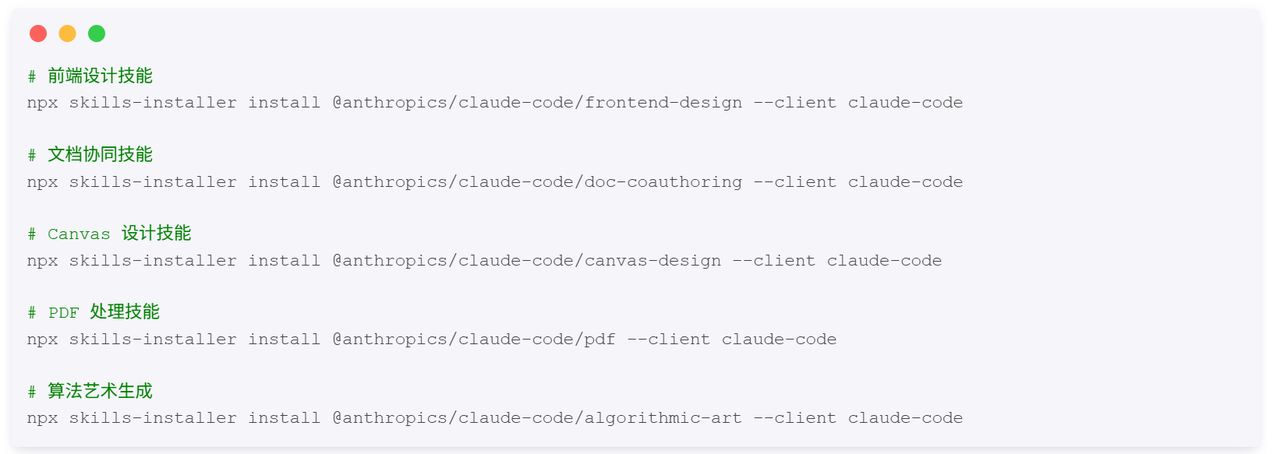
如何使用 Skills
查看可用 Skills:

调用 Skill:

如何编写自己的 Skills
Skill 目录结构:

skill.json 示例:
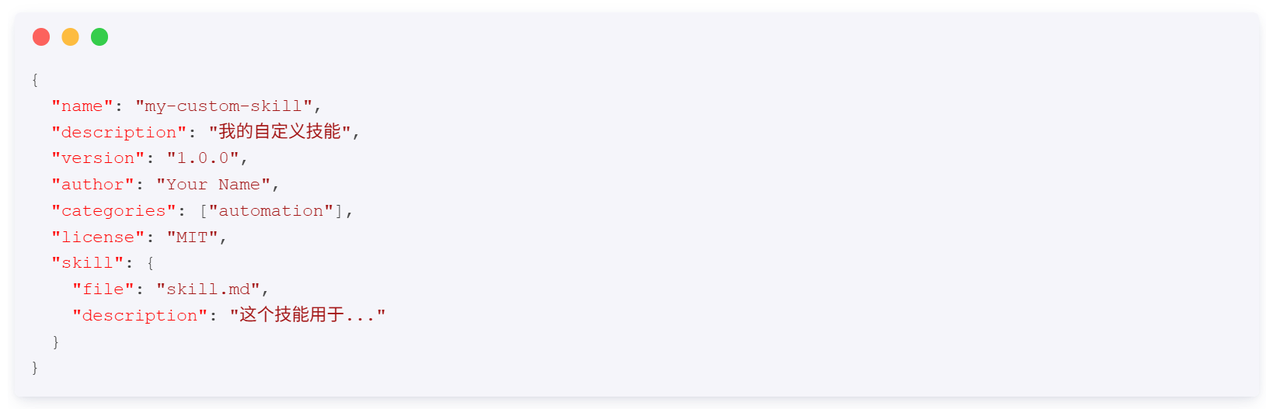
skill.md 示例:
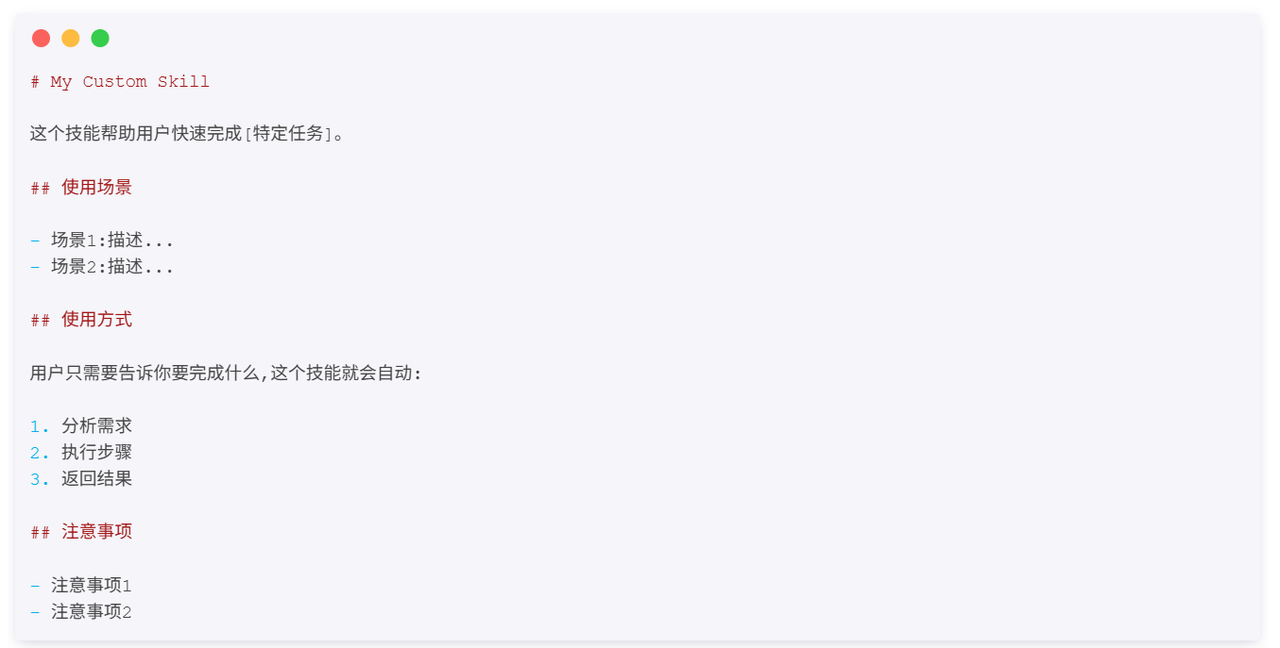
安装本地 Skill:
