AI Agent实战:搭建企业级 RAG 知识库
👍
在 AI 大模型时代,如何让 AI "读懂"企业内部文档并精准回答?
•
RAG(检索增强生成)是目前最成熟的落地方案。
•
本文将手把手带你用 LangChain 搭建一套完整的企业级 RAG 知识库系统。
一、什么是 RAG?
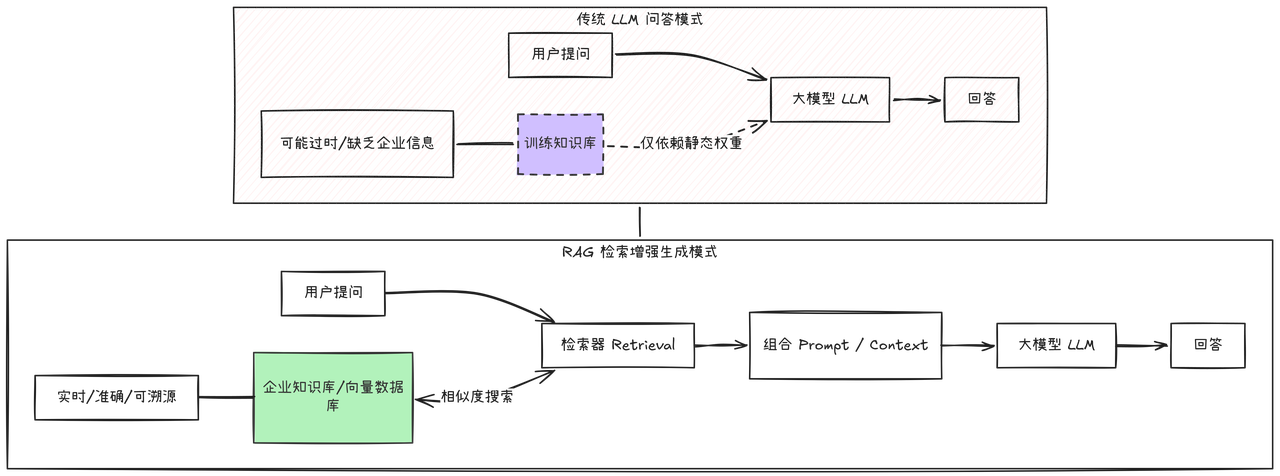
RAG(Retrieval-Augmented Generation)的核心思想是:先检索,再生成。将用户问题与文档库中的相关片段匹配,再将检索到的内容作为上下文喂给大模型,从而获得准确且有依据的回答。
传统 LLM vs RAG 对比
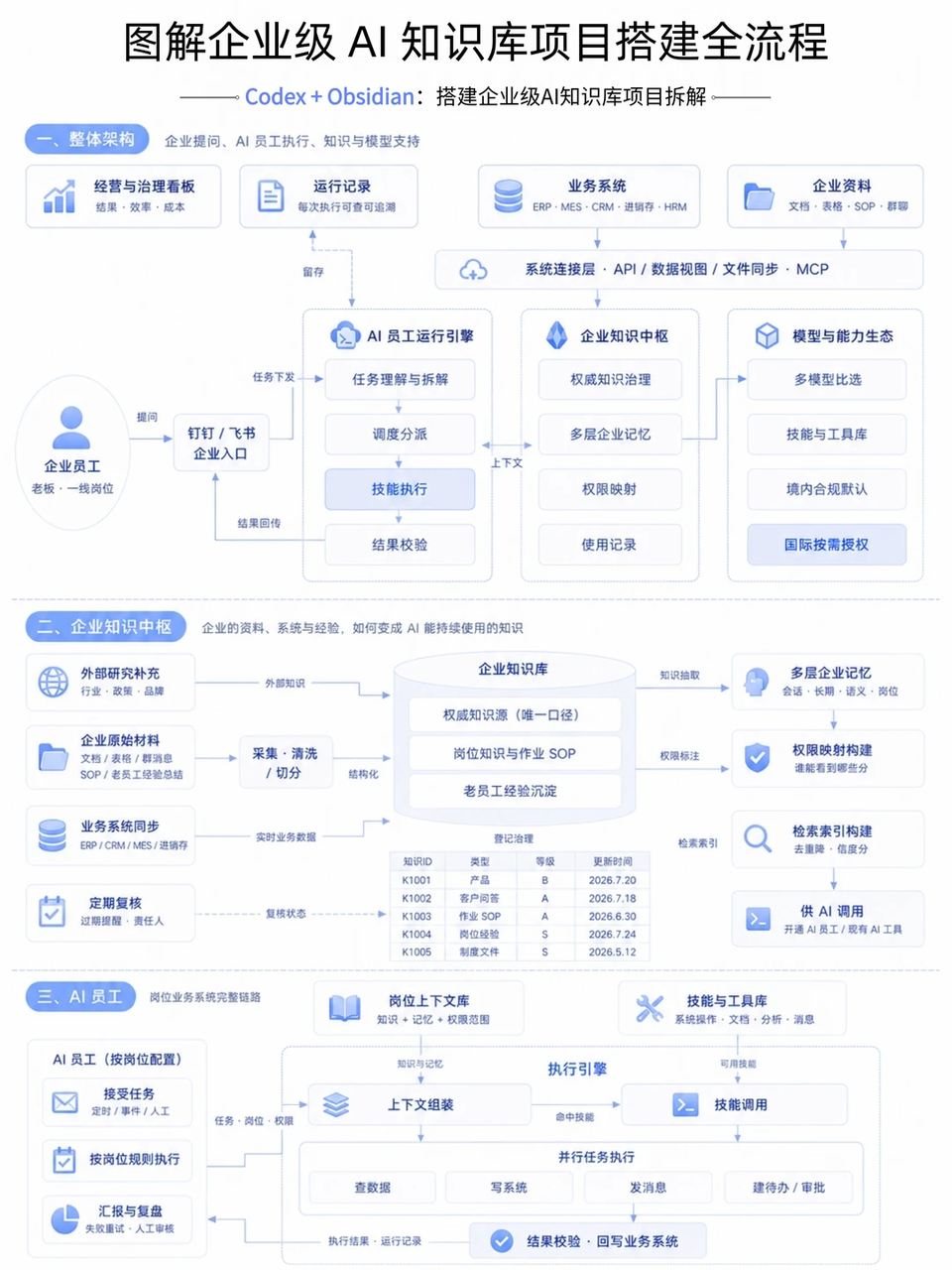
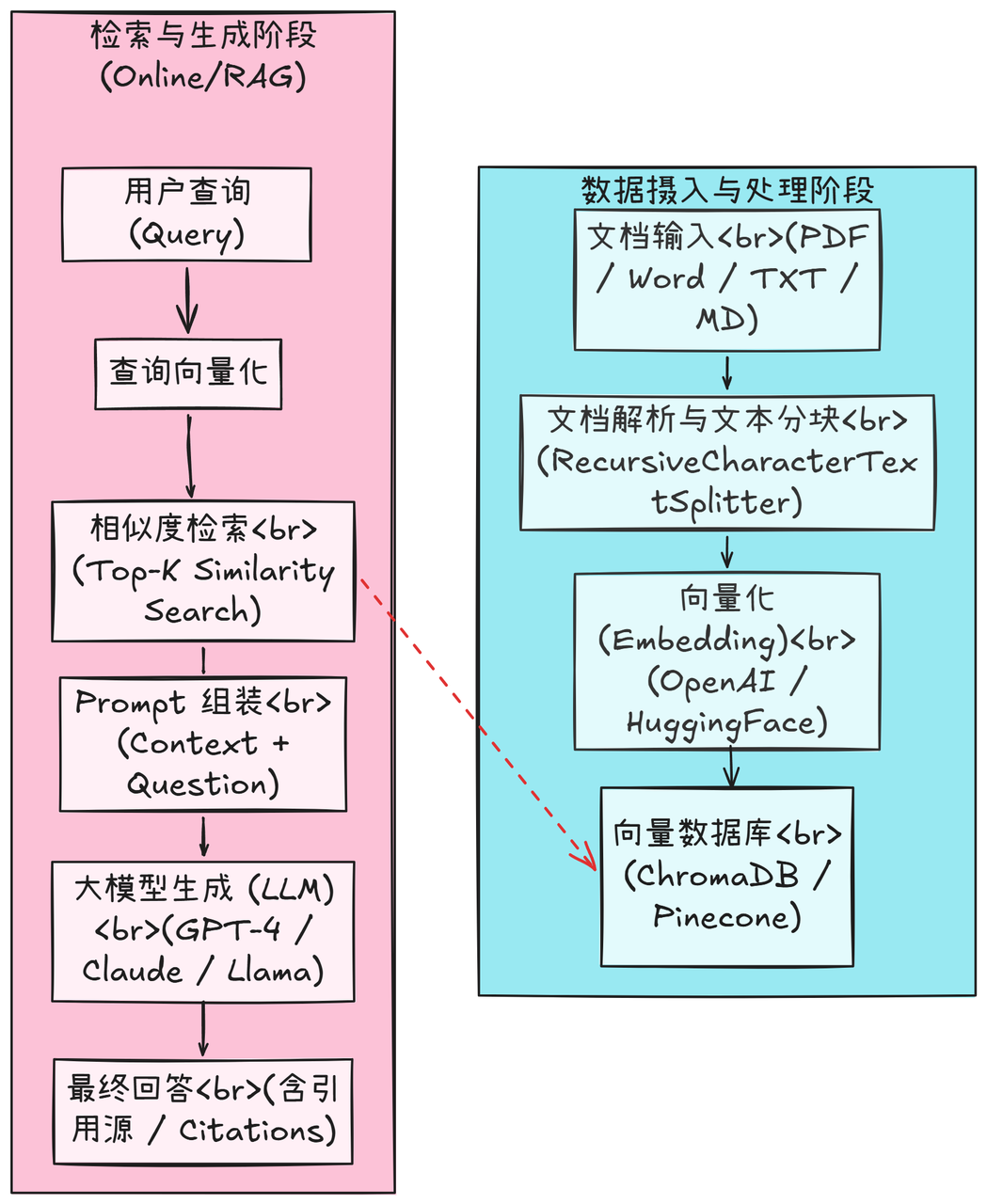
二、系统架构总览
代码块
Plain Text
┌──────────┐ ┌───────────┐ ┌──────────────┐ ┌──────────┐
│ 文档输入 │───►│ 文档解析与 │───►│ 向量化与存储 │───►│ 向量数据库 │
│ PDF/Word │ │ 文本分块 │ │ (Embedding) │ │ ChromaDB │
│ /TXT/MD │ │ │ │ │ │ │
└──────────┘ └───────────┘ └──────────────┘ └──────────┘
│
▼
┌──────────┐ ┌───────────┐ ┌──────────────┐ ┌──────────────┐
│ 最终回答 │◄───│ 大模型生成 │◄───│ Prompt 组装 │◄───│ 相似度检索 │
│ (含引用源) │ │ (LLM) │ │ (上下文+问题) │ │ (Top-K 匹配) │
└──────────┘ └───────────┘ └──────────────┘ └──────────────┘
48%
52%
三、环境准备
3.1 安装依赖
代码块
Plain Text
pip install langchain langchain-openai langchain-community
pip install chromadb sentence-transformers
3.2 项目结构
代码块
Bash
enterprise-rag/
├── app/
│ ├── main.py # FastAPI 入口
│ ├── config.py # 配置管理
│ ├── document_loader.py # 文档加载与解析
│ ├── chunker.py # 文本分块
│ ├── embedder.py # 向量化
│ ├── vectorstore.py # 向量数据库管理
│ ├── retriever.py # 检索器
│ ├── chain.py # RAG 链
│ └── api/
│ ├── routes.py # API 路由
│ └── schemas.py # 数据模型
四、核心模块实现
4.1 配置管理
代码块
Python
# app/config.py
from pydantic_settings import BaseSettings
from functools import lru_cache
class Settings(BaseSettings):
# LLM 配置
openai_api_key: str = ""
openai_base_url: str = "https://api.openai.com/v1"
llm_model: str = "gpt-4o-mini"
4.2 文档加载与解析
代码块
Python
# app/document_loader.py
from pathlib import Path
from langchain_community.document_loaders import (
PyPDFLoader,
Docx2txtLoader,
TextLoader,
UnstructuredMarkdownLoader,
)
from langchain_core.documents import Document
from typing import List
class DocumentLoader:
"""多格式文档加载器"""
LOADER_MAP = {
4.3 文本分块
代码块
Python
# app/chunker.py
from langchain.text_splitter import RecursiveCharacterTextSplitter
from langchain_core.documents import Document
from app.config import get_settings
class TextChunker:
"""智能文本分块器"""
def __init__(self):
settings = get_settings()
4.4 向量化与存储
代码块
Python
# app/embedder.py
from langchain_openai import OpenAIEmbeddings
from app.config import get_settings
代码块
Python
# app/vectorstore.py
from langchain_community.vectorstores import Chroma
from langchain_core.documents import Document
from app.config import get_settings
from app.embedder import get_embeddings
class VectorStoreManager:
"""向量数据库管理器"""
4.5 RAG 链(核心)
代码块
Python
# app/chain.py
from langchain_openai import ChatOpenAI
from langchain_core.prompts import ChatPromptTemplate
from langchain_core.output_parsers import StrOutputParser
from langchain_core.runnables import RunnablePassthrough, RunnableParallel
from app.config import get_settings
4.6 FastAPI 服务封装
代码块
Python
# app/api/schemas.py
from pydantic import BaseModel
class QueryRequest(BaseModel):
代码块
Python
代码块
Python
# app/main.py
from fastapi import FastAPI
from app.api.routes import router
app = FastAPI(
title="企业级 RAG 知识库",
description="基于 LangChain 的 RAG 知识库问答系统",
version="1.0.0",
)
五、使用流程
5.1 启动服务
代码块
Markdown
# 1. 配置环境变量
cp .env.example .env
# 编辑 .env,填入 OPENAI_API_KEY
# 2. 导入文档
curl -X POST http://localhost:8000/api/v1/ingest \
5.2 问答测试
代码块
Plain Text
curl -X POST http://localhost:8000/api/v1/query \
-H "Content-Type: application/json" \
-d '{"question": "公司的年假政策是什么?"}'
5.3 完整调用流程图
代码块
Plain Text
六、进阶优化建议
重排序示例(Reranker)
代码块
Plain Text
from langchain_community.document_compressors import CohereRerank
七、总结
本文从零搭建了一套企业级 RAG 知识库系统,核心组件包括:
💪
•
文档加载器 — 支持 PDF、Word、TXT、Markdown 多格式
•
智能分块 — RecursiveCharacterTextSplitter 兼顾语义完整性和检索粒度
•
向量存储 — ChromaDB 轻量级本地向量数据库