什么是 Function Calling?它是如何工作的?
难度:基础 分类:Tool Use
简短回答
Function Calling(也叫 Tool Use)是让 LLM 能够调用外部函数/API 的能力。关键理解:LLM 本身不执行任何工具,它只是生成结构化的 JSON 输出,指定要调用哪个函数以及传入什么参数。实际的函数执行由你的应用代码完成,执行结果再返回给 LLM 以生成最终回答。这个能力将 LLM 从"只能说"的顾问升级为"能做事"的执行者。
详细解析
核心工作流程(5 步)
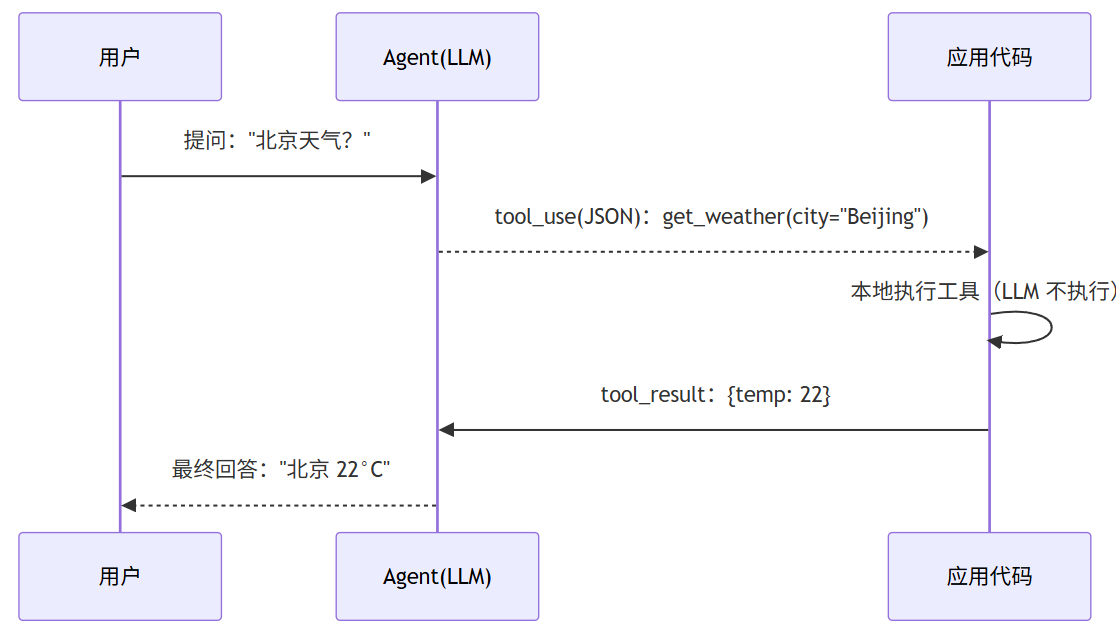
LLM 只生成调用请求、不执行工具:请求与结果在用户、LLM、应用代码之间往返一圈才得到回答。
每一步详解
Step 1: 定义工具(Tool Definition)
工具定义包含三要素:名称、描述、参数 Schema。
代码块
Python
# Anthropic Claude 的工具定义
tools = [
{
"name": "get_weather",
"description": "获取指定城市的当前天气信息。当用户询问天气时使用此工具。",
"input_schema": {
"type": "object",
"properties": {
"city": {
"type": "string",
"description": "城市名称,如 'Beijing' 或 'New York'"
},
"unit": {
"type": "string",
Step 2-3: 发送请求并获取 LLM 决策
代码块
C++
import anthropic
client = anthropic.Anthropic()
response = client.messages.create(
model="claude-sonnet-4-5-20250929",
max_tokens=1024,
tools=tools,
Step 4: 本地执行工具
代码块
Python
# 你的代码负责实际执行
def get_weather(city: str, unit: str = "celsius") -> dict:
# 调用真实的天气 API
result = weather_api.get(city=city, unit=unit)
return {"temperature": result.temp, "condition": result.condition}
# 解析 LLM 的请求并执行
tool_call = response.content[0]
result = get_weather(**tool_call.input)
Step 5: 将结果返回 LLM
代码块
Python
# 将工具结果发回 LLM,让它生成最终回答
# 注意:Anthropic tool_result 的 content 推荐直接传 string(即 LLM 看到的工具输出文本)
# 把 dict 用 json.dumps 序列化只是把"展示给 LLM 的字符串"显式构造一次,并非协议要求
final_response = client.messages.create(
model="claude-sonnet-4-5-20250929",
max_tokens=1024,
tools=tools,
messages=[
{"role": "user", "content": "北京现在多少度?"},
{"role": "assistant", "content": response.content},
{"role": "user", "content": [
{
"type": "tool_result",
"tool_use_id": tool_call.id,
OpenAI vs Anthropic 的实现差异
核心流程相同,API 格式不同。LangChain 等框架提供了统一抽象层。注意:OpenAI 自 2023-11 起将 function_call / function role 重命名为 tool_calls / tool role,旧字段仍向后兼容但官方推荐迁移。
单次 vs 多次工具调用
LLM 可能在一次回复中请求多个工具调用(并行),也可能需要多轮对话中多次调用不同工具(顺序):
代码块
Markdown
# 并行调用:LLM 一次返回多个工具请求
# "比较北京和上海的天气"
# → tool_use: get_weather(city="Beijing")
# → tool_use: get_weather(city="Shanghai")
# 顺序调用(Agent Loop):
# "查询订单状态并发送提醒邮件"
# Round 1: tool_use: get_order_status(order_id="123")
# Round 2: tool_use: send_email(to="user@example.com", subject="...")
Function Calling vs MCP
表格加载中...
常见误区 / 面试追问
误区:"LLM 直接执行了工具" — LLM 只生成 JSON 格式的调用请求,实际执行完全在你的应用代码中。LLM 不访问任何外部系统。
误区:"Function Calling = Agent" — Function Calling 是 Agent 的一个能力组件。Agent 还需要自主决策循环(Agent Loop)、记忆、规划等模块。单次 Function Calling 不构成 Agent。
追问:"LLM 怎么知道该调用哪个函数?" — 主要依据工具的 description 字段。LLM 分析用户意图与工具描述的语义匹配度来选择工具。好的 description 是工具选择准确率的关键。
追问:"如果 LLM 生成了错误的参数怎么办?" — 应该在执行前验证参数(Schema 验证)。始终将 LLM 输出视为不可信输入,在系统边界做验证。