01多机器人搬运家具强化学习
CooHOI: 通过操控物体动力学学习协作式人-物交互
论文 "CooHOI: Learning Cooperative Human-Object Interaction with Manipulated Object Dynamics" 的官方实现。
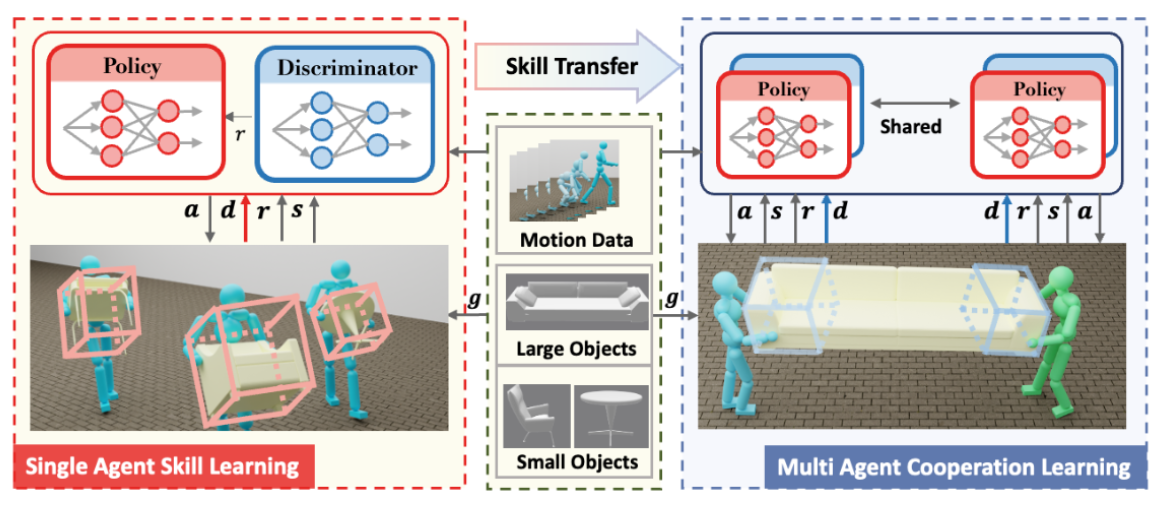
该框架采用两阶段学习范式。在第一阶段,如左图所示,我们使用AMP框架训练单智能体搬运技能。在第二阶段,我们将这些单智能体技能迁移到协作环境中。值得注意的是,我们利用物体的动态作为反馈信息和隐式通信渠道,如图中边界框所示。
安装
下载 Isaac Gym (https://developer.nvidia.com/isaac-gym),或使用命令行指令:
Bash
代码块
Plain Text
wget https://developer.nvidia.com/isaac-gym-preview-4
tar -xvzf isaac-gym-preview-4
创建 conda 环境:
Bash
代码块
Plain Text
conda create -n coohoi python=3.8
conda activate coohoi
安装 IsaacGym 的 Python 包装器:
Bash
代码块
Plain Text
pip install -e isaacgym/python
安装其他依赖项:
Bash
代码块
Plain Text
如果遇到以下错误: ImportError: libpython3.8m.so.1.0: cannot open shared object file: No such file or directory,需要设置环境变量:
Bash
代码块
Plain Text
export LD_LIBRARY_PATH=/path/to/conda/envs/your_env/lib
查看在单智能体物体搬运任务上的结果:
如果内存不足,建议num env设置为1或者4
Bash
代码块
Plain Text
CUDA_VISIBLE_DEVICES=0 python coohoi/run.py --test \
查看我们在双智能体物体搬运任务上的结果:
Bash
代码块
Plain Text
CUDA_VISIBLE_DEVICES=0 python coohoi/run.py --test \
--task ShareHumanoidCarryObject \
--num_envs 16 \
--cfg_env coohoi/data/cfg/share_humanoid_carrybox.yaml \
--cfg_train coohoi/data/cfg/train/share_humanoid_task_coohoi.yaml \
--motion_file coohoi/data/motions/coohoi_data/coohoi_data.yaml \
--checkpoint coohoi/data/models/TwoAgent.pth
单人形机器人技能训练
训练指令:
Bash
代码块
Plain Text
CUDA_VISIBLE_DEVICES=0 python coohoi/run.py \
--task HumanoidAMPCarryObject \
--cfg_env coohoi/data/cfg/humanoid_carrybox.yaml \
--cfg_train coohoi/data/cfg/train/amp_humanoid_task.yaml \
--motion_file coohoi/data/motions/coohoi_data/coohoi_data.yaml \
--headless \
--wandb_name "<experiement_name>"
将在 output/Humanoid_
Bash
代码块
Plain Text
例如:
Bash
代码块
Plain Text
CUDA_VISIBLE_DEVICES=0 python coohoi/run.py --test \
--task HumanoidAMPCarryObject \
--num_envs 16 \
--cfg_env coohoi/data/cfg/humanoid_carrybox.yaml \
--cfg_train coohoi/data/cfg/train/amp_humanoid_task.yaml \
--motion_file coohoi/data/motions/coohoi_data/coohoi_data.yaml \
双人形机器人协作训练
默认情况下,双人形机器人协作训练从微调单人形机器人策略开始。我们在 --checkpoint <ckpt_path> 中加载单智能体策略的权重文件,可以将其更改为自己的权重文件。
协作训练:
Bash
代码块
Plain Text
CUDA_VISIBLE_DEVICES=0 python coohoi/run.py \
--task ShareHumanoidCarryObject \
--cfg_env coohoi/data/cfg/share_humanoid_carrybox.yaml \
--cfg_train coohoi/data/cfg/train/share_humanoid_task_coohoi.yaml \
--motion_file coohoi/data/motions/coohoi_data/coohoi_data.yaml \
--headless \
--is_finetune \
--pretrain_checkpoint <ckpt_path> \
注意:<ckpt_path> 应为单智能体策略权重文件的相对路径。此权重文件将用于初始化协作策略。
例如:
Bash
代码块
Plain Text
CUDA_VISIBLE_DEVICES=0 python coohoi/run.py \
--task ShareHumanoidCarryObject \
--cfg_env coohoi/data/cfg/share_humanoid_carrybox.yaml \
--cfg_train coohoi/data/cfg/train/share_humanoid_task_coohoi.yaml \
--motion_file coohoi/data/motions/coohoi_data/coohoi_data.yaml \
--headless \
--is_finetune \
--pretrain_checkpoint coohoi/data/models/SingleAgent.pth \
--wandb \
--wandb_name "CooHOI Training"
评估:
Bash
代码块
Plain Text
CUDA_VISIBLE_DEVICES=0 python coohoi/run.py --test \
--task ShareHumanoidCarryObject \
--num_envs 16 \
--cfg_env coohoi/data/cfg/share_humanoid_carrybox.yaml \
--cfg_train coohoi/data/cfg/train/share_humanoid_task_coohoi.yaml \
--motion_file coohoi/data/motions/coohoi_data/coohoi_data.yaml \
--checkpoint <ckpt_path>
其他参考内容
•
初始代码基于 ASE 项目。
•
运动数据集来自 AMASS 数据集。
•
物体数据集来自 SAMP 数据集。